

Many users like the simplicity of clicking one button to register and/or
log into a website using one of their existing logged-in accounts on another
website such as Facebook or Google. This is OAuth user authentication. But
sometimes users don’t have those other accounts so it’s good to provide them
with a full-proof means of logging in to a site. That’s username/password
authentication. Well for your site why don’t you give users both options?
In this article, I’ll talk about how you can log in and register users for your flask application with flexibility by allowing either OAuth2 or username/password authentication. We’ll be using Flask for our web framework, MongoDB for our database, and authomatic for our OAuth authentication framework. But if those don’t apply to you, don’t fret! Many of the concepts discussed here can be applied to your web stack too!
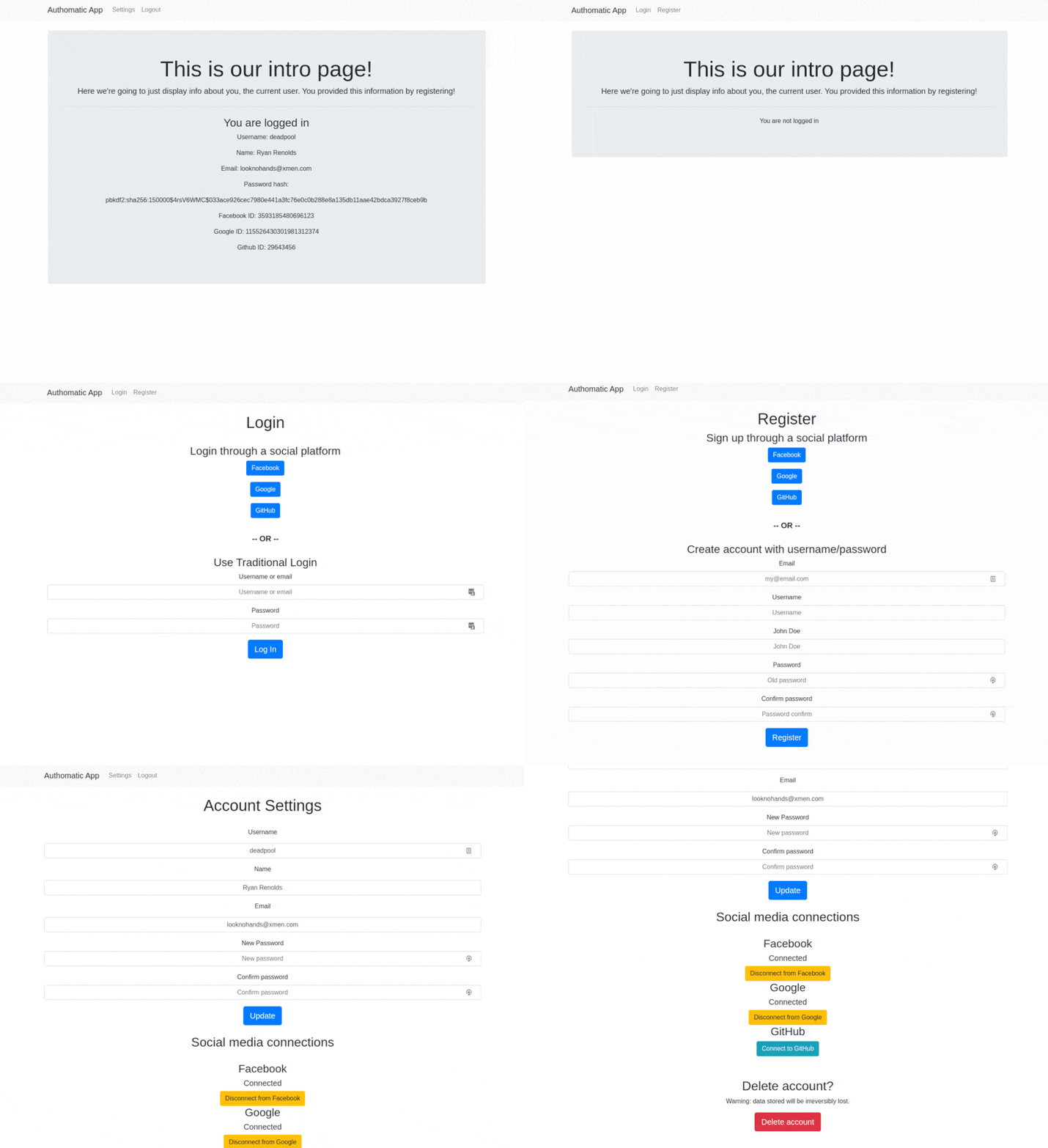
The end product will look something like this:
The code
If you just want to jump ahead to the code, you can view all files discussed here at this GitHub repository.
What is OAuth2
OAuth2 is the latest industry-standard protocol for authorization. Its uses can be broad including allowing websites to collect information from users or posting to a user’s social media on their behalf. But one of its most common uses is what we’ll be using it for – simply as a means of proving a user is who they say they are to log them into our website.
We won’t get into the specifics of the OAuth2 protocol, but here’s an image displaying the gist of how the 3-way handshake between the user, the authenticating website, and your website works.

For this tutorial, we are going to use the python OAuth framework authomatic
to manage this handshake and log users in. I like the authomatic framework
because it is comprehensive enough to authenticate with most common OAuth
authentication providers without much work on our end, while still being
flexible about allowing us to decide how to use the information
provided by the OAuth handshake.
MongoDB database

MongoDB is the most popular NoSQL database – meaning data isn’t stored in a table but JSON formatted documents. I like using a NoSQL database because I find it very scalable and easy to manage. For instance, you can add/remove new database fields without migrations, and you can link data in complex patterns that require multiple linked tables in SQL. Note, however, that all the database transactions performed in this article could just as easily work with a SQL database.
If you don’t already have a MongoDB database but would like to get one managed for free to follow along with this article, go to MongoDB Atlas, create an account, and click the free tier.
Outline our flask application
To give you an overview of the end product of our modest flask application I will provide a file structure outline here, and then we’ll talk about filling out these files as the blog post progresses. Your file structure might differ based on how you want to set up your flask application. I set this example app up this way with blueprints because I think it will more accurately reflect your real-world application.
flak_authomatic_example/
|
├── root/
|   ├── core/
|   |   ├── __init__.py
|   |   └── views.py
|   |
|   ├── static/
|   ├── templates/
|   |   ├── core
|   |   |   ├── base.html
|   |   |   ├── flash_messages.html
|   |   |   ├── imports.html
|   |   |   ├── index.html
|   |   |   └── navbar.html
|   |   |
|   |   └── users/
|   |       ├── login.html
|   |       ├── register.html
|   |       └── settings.html
|   |
|   └── users/
|       ├── __init__.py
|       ├── custom_form_validators.py
|       ├── forms.py
|       ├── models.py
|       ├── oauth_config.py
|       ├── test_oauth.py
|       └── views.py
|
├── .env
├── .gitignore
├── app.py
├── README.md
└── requirements.txt
Python requirements
You are going to need to pip install a couple of packages in your virtual environment before getting started:
- Flask (our web framework)
- Flask-WTF (to create flask forms)
- flask-login (our login and session manager)
- flask-mongoengine (MongoDB database adapter)
- authomatic (our OAuth2 handling framework)
- python-dotenv (for managing environment variables)
Your requirements.txt should look something like this:
requirements.txt
# Flask
Flask==1.1.1
Flask-WTF==0.14.3
Flask-Login==0.5.0
email-validator==1.1.0

# Database
flask-mongoengine==0.9.5

# OAuth
Authomatic==1.0.0

# Environment variables management
python-dotenv==0.13.0
You can install these dependencies with:
pip install -U -r requirements.txt
or if you don’t have a requirements.txt file, install with:
pip install Flask Flask-WTF flask-login flask-mongoengine authomatic python-dotenv
Environment variable setup
It’s never a good idea to store your app secrets in your source code because
it is a serious security vulnerability. So we are going to store our app
secrets in environment variables. To make it easier on ourselves though, we
are going to persist those environment variables in a file named .env. Then
our python-dotenv package installed above will convert the file to
environment variables on our system. MAKE SURE TO ADD .env TO YOUR
.gitignore FILE TO PREVENT STORING THE SECRETS IN YOUR CHECKED IN
SOURCE CODE. Our .env template will look like this
(you’ll have to fill in the values as you go):
.env
# Randomly generate complex secrete keys in production

# FLASK SETTINGS
SECRET_KEY="my_super_secret_key_for_flask"
FLASK_ENV="development"

# MONGODB DATABASE SETTINGS
AUTHENTICATION_SOURCE="admin"
MONGODB_HOST=mongodb+srv://CLUSTER_INFO.mongodb.net/COLLECTION_NAME
MONGODB_PORT=27017
MONGODB_USERNAME="MY_MONGODB_USERNAME"
MONGODB_PASSWORD="MY_MONGODB_PASSWORD"

# OAUTH SETTINGS
AUTHOMATIC_SECRET="some_super_secret_string_for_authomatic"
OAUTHLIB_INSECURE_TRANSPORT="1"
OAUTHLIB_RELAX_TOKEN_SCOPE="1"
FACEBOOK_ID="SOME_ID_STRING_PROVIDED_BY_FACEBOOK"
FACEBOOK_SECRET="SOME_SECRET_STRING_PROVIDED_BY_FACEBOOK"
GOOGLE_ID="SOME_ID_STRING_PROVIDED_BY_GOOGLE"
GOOGLE_SECRET="SOME_SECRET_STRING_PROVIDED_BY_GOOGLE"
GITHUB_ID="SOME_ID_STRING_PROVIDED_BY_GITHUB"
GITHUB_SECRET="SOME_SECRET_STRING_PROVIDED_BY_GITHUB"
Make sure to ignore this environment file in your .gitignore file
as it contains secrets you should not let browsers of your source code know.
.gitignore
.env
venv/
We want to load these environment variables into our environment on app startup.
To do so we’ll call load_dotenv (imported from dotenv) in our app.py
file.
Registering your application with OAuth providers
OAuth providers used to authenticate users need to know about your website
before they will authenticate users for you and give you any of their data.
So we’ll have to register our website with them and give them a couple of extra
details such as what page on our website will contact them. For this guide
(and for the blog you’re reading) I’ve chosen Facebook, Google, and
GitHub as OAuth authentication providers, but note there is a long list
of providers supported by authomatic, with the possibility of adding in
providers that are not supported out of the box. Here are the steps for
registering your app we the 3 above-mentioned providers:
Registering with Facebook
- Log in to Facebook
- Go to https://developers.facebook.com/apps/
- Click the “Add a new App” button
(you’ll be prompted to provide a
Display NameandContact Email) - Under
Add a Productthere will be a box forFacebook Login. ClickSet upin that box. - Click
Web - For the
Site URLusehttp://localhost:5000/and then save (localhost for testing) - Ignore the remaining steps in the quickstart. Click
Settings->Basicin the left-hand dashboard - Grab the
App IDandApp Secretfrom the first 2 fields and store them in your .env - You’re all set for Facebook OAuth! (at least for Development)
Registering with Google
- Log in to Google
- Go to https://console.developers.google.com/
- Click
Select a projectin the bar at the top of the page - Click
NEW PROJECT - Give your project a name and press
CREATE - Click the
OAuth consent screenbutton in the left-hand panel - Select
externaland pressCREATE - Fill out the
Application namefield with whatever you like and pressSAVE(fill out no other fields) - Click
Credentialson the left-hand screen - Click
+CREATE CREDENTIALSin the top bar andOAuth client IDfrom the dropdown - Set
Application typetoWeb application - Fill out the
Name*field with your app name - Click
+ ADD URIunderAuthorized redirect URIs - Fill in with
http://localhost:5000/users/google_oauth(the page we will call this OAuth from) - Click
create - Copy the
Your Client IDandYour Client Secretinto the.envfile and hitok - You’re all set for Google OAuth! (at least for Development)
Registering with GitHub
- Log in to GitHub
- Go to https://github.com/settings/developers
- Click
New OAuth App - Fill out the
Application namefield with your app name - Fill out the
Homepage URLfield withhttp://localhost:5000 - Fill out the
Authorization callback URLfield withhttp://localhost:5000/users/github_oauth(the page we will call this OAuth from) - Click
Register application - Store the
Client IDandClient Secretin the.envfile - You’re all set for Google OAuth! (at least for Development)
Creating the OAuth configuration file

Authomatic is our library that
will perform OAuth communication between our website and the OAuth providers.
Now that we have registered our app with OAuth providers, we need to set up
a configuration file that authomatic will use to interact with those
providers. The configuration file should look something like this:
root/users/oauth_config.py
"""Authomatic OAuth configuration file

Pull secret ids and keys from environment variables set in .env
"""

import os

from authomatic import Authomatic
from authomatic.providers import oauth2

OAUTH_CONFIG = {
    "Facebook": {  # This name is arbitrary but is easier if it matches the OAuth provider name
        "id": 1,  # These id numbers are arbitrary
        "class_": oauth2.Facebook,  # Use authomatic's Facebook handshake
        "consumer_key": os.getenv("FACEBOOK_ID"),
        "consumer_secret": os.getenv("FACEBOOK_SECRET"),
    },
    "Google": {
        "id": 2,  # These id numbers are arbitrary
        "class_": oauth2.Google,
        "consumer_key": os.getenv("GOOGLE_ID"),
        "consumer_secret": os.getenv("GOOGLE_SECRET"),
        # Google requires a scope be specified to work properly
        "scope": ["profile", "email"],
    },
    "GitHub": {
        "id": 3,  # These id numbers are arbitrary
        "class_": oauth2.GitHub,  # Use authomatic's GitHub handshake
        # GitHub requires a special header to work properly
        "access_headers": {"User-Agent": "YOUR_APP_NAME"},  # Fill in with your app name
        "consumer_key": os.getenv("GITHUB_ID"),
        "consumer_secret": os.getenv("GITHUB_SECRET"),
    },
}

# Instantiate Authomatic.
authomatic = Authomatic(
    OAUTH_CONFIG,
    os.getenv("AUTHOMATIC_SECRET"),
    report_errors=True,  # Set to False in production
)
Test that our OAuth provider registration and config file works
To test that our OAuth registration and config files work we are going
to create a file under root/users/ called test_oauth. This file
won’t be used in our final code, but we’ll copy over some of its
functionality to our final product later. It will be a small, fully
enclosed flask app, that when called at the right routes, will deliver
the user’s data from the OAuth provider in JSON format. Let’s take a look:
root/users/test_oauth.py
"""A file for testing OAuth setup"""
from authomatic.adapters import WerkzeugAdapter
from flask import Flask, make_response, request

from oauth_config import authomatic

app = Flask(__name__)


@app.route("/")
def index():
    """Landing page for our OAuth test with hyperlinks to each OAuth test"""
    return """
    <p><a href="/users/facebook_oauth">Go to Facebook</a></p>
    <p><a href="/users/google_oauth">Go to Google</a></p>
    <p><a href="/users/github_oauth">Go to GitHub</a></p>
    """


@app.route("/users/facebook_oauth")
def facebook_oauth():
    """Ask for Facebook OAuth data"""
    return oauth_generalized("Facebook")


@app.route("/users/google_oauth")
def google_oauth():
    """Ask for Google OAuth data"""
    return oauth_generalized("Google")


@app.route("/users/github_oauth")
def github_oauth():
    """Ask for GitHub OAuth data"""
    return oauth_generalized("GitHub")


def oauth_generalized(oauth_client):
    """Generalized OAuth data retrieval"""
    # Get response object for the WerkzeugAdapter.
    response = make_response()
    # Log the user in, pass it the adapter and the provider name.
    result = authomatic.login(WerkzeugAdapter(request, response), oauth_client)
    # If there is no LoginResult object, the login procedure is still pending.
    if not result:
        return response
    # If there is no result.user something went wrong
    if not result.user:
        return "Failed to retrieve OAuth user"

    # Update user to retrieve data
    result.user.update()

    # Return a dictionary containing the user data
    # Flask automatically converts the dictionary to JSON
    return result.user.data


if __name__ == "__main__":
    # Initiate app
    app.run()
Running the flask app with python root/users/test_oauth.py will bring you
to a landing page with hyperlinks to access the user’s data through OAuth
at the three OAuth providers we set up previously. If your OAuth providers
were set up correctly according to the above steps, you should get a JSON
document returned with your data after you log in through a given provider.
The JSON will look something like this (example for Facebook OAuth return):
{
  "first_name": "Myfirstname",
  "id": "1234567890987654",
  "last_name": "Mylastname",
  "picture": {
    "data": {
      "height": 50,
      "is_silhouette": false,
      "url": "https://platform-lookaside.fbsbx.com/platform/profilepic/?asid=jasdfasdfasdfasfasdfasdfasd",
      "width": 50
    }
  }
}
The JSON documents for Google and GitHub will look similar but
with a few different fields included. Importantly, each of them should have
an id field. This is the field the OAuth provider
associates as a user’s ID for their site and it will be unchangeable for
each user. Therefore it is going to be the piece of data we will store in
our database to uniquely identify our site’s user was verified as logged
in through the OAuth provider. If the OAuth provider returns that ID
we know who they are and we can log them in. While we’re at it, if we are
registering a user to our site for the first time through OAuth, we can
snag a couple of other bits of information if we so choose, such as the user’s
name or email if that either is offered. More on this later when we create
the root/users/view.py file.
Setting up the flask app skeleton
Now that we have our OAuth setup working with our three OAuth provider options, let’s start building up the foundation of our flask application. For this Flask app, we are going to be using a factory method for starting the app. The app will be called from the base of our repository with a simple start-up file.
app.py
"""This is the main file called to run the flask application"""
from dotenv import load_dotenv

from root.factory import create_app

if __name__ == "__main__":
    load_dotenv()
    app = create_app()
    app.run()
Remember, we need to call load_dotenv to load the environment variables
that we set in our .env file.
Notice how we are running the logic to create the app from another
module (root.factory). This is the factory and it looks like so.
root/factory.py
import os
from datetime import datetime

from bson import ObjectId, json_util
from flask import Flask
from flask.json import JSONEncoder

from root.core.views import core
from root.globals import db, login_manager
from root.users.views import users


class MongoJsonEncoder(JSONEncoder):
    """Adjustments to the Flask json encoder for MongoEngine support"""

    def default(self, obj):
        if isinstance(obj, datetime):
            return obj.strftime("%Y-%m-%d %H:%M:%S")
        if isinstance(obj, ObjectId):
            return str(obj)
        return json_util.default(obj, json_util.CANONICAL_JSON_OPTIONS)


def create_app():
    """Create the flask application"""

    # Initiate app
    app = Flask(__name__)
    app.json_encoder = MongoJsonEncoder

    # Update app.config from environment variables
    app.config["SECRET_KEY"] = os.getenv("SECRET_KEY")
    app.config["MONGODB_SETTINGS"] = {
        "authentication_source": "admin",
        "host": os.getenv("MONGODB_HOST"),
        "port": int(os.getenv("MONGODB_PORT")),
        "username": os.getenv("MONGODB_USERNAME"),
        "password": os.getenv("MONGODB_PASSWORD"),
    }

    # register blueprints
    app.register_blueprint(core, url_prefix="")
    app.register_blueprint(users, url_prefix="/users")

    # initialize database
    db.init_app(app)

    # initialize login manager
    login_manager.init_app(app)
    login_manager.login_view = "users.login"

    return app
This create_app factory function does a few important things.
- It instantiates an instance of the
Flaskobject to create the app - We alter the app’s
json_encoderto properly work with mongoengine objects - We register 2 blueprints to the app. You’ll probably register several more for your app. - The blueprints act as mini-flask apps that we can use to organize our app into modules with different functionality.
- We add the app to our mongo_engine database so the 2 can work together
- We add the app to the login manager and set the login view to the login
view we’ll create later under the
loginof theusersblueprint
Now we need to set up our database and login manager. We’ll establish
both of these important objects in a module we’re calling globals.py under
the root directory.
root/globals.py
"""Global variables and objects to import into other modules.

Kept separate from the factory to avoid infinite import loops when importing
these global objects into multiple modules.
"""
from flask_login import LoginManager
from flask_mongoengine import MongoEngine

# Database setup
db = MongoEngine()

# Login manager setup
login_manager = LoginManager()
This simple module just instantiates instances of the MongoEngine and
LoginManager classes that will be the backbone of our database and
session management respectively. Recall these objects receive the Flask app
object in root/factory.py and will be imported as necessary into other
modules in our app.
The core package
Our core package is the simpler of the 2 package blueprints we’ll be
creating for this application. The package has a file, views.py with one
view route enclosed, our index (or landing page) route. Why even bother
making this a blueprint then? It’s true, we could have just created an
index/route in app.py. However, in your real application, you might house
several other views in this package and I think it’s cleaner having the
app.py as bare as possible, with all routes designated to separate
blueprint views. So here’s our core views.py file:
root/core/views.py
"""Core views"""
from flask import Blueprint, render_template

core = Blueprint("core", __name__)


@core.route("/")
def index():
    """This is the landing page view"""
    return render_template("core/index.html")
Let’s set up the templates for the core package. Our HTML templates for this
flask application will be stored under the root directory and we are going
to separate the templates under sub-directories named after our blueprints
to make it easier to find templates associated with specific blueprints.
First, we’ll need a base jinja file that will be the
core of all user-visible html views. It looks like so:
root/templates/core/base.html
<!DOCTYPE html>
<html lang="en">
  <head>
    <meta charset="UTF-8">
    <meta name=viewport content="width=device-width, initial-scale=1.0">
    {% include "core/imports.html" %}
    <title>flask authomatic example</title>
  </head>
  <body>
    {% include 'core/navbar.html' %}
    {% include 'core/flash_messages.html' %}
    <br>
    {% block content %}{% endblock content %}
    <br><br>
  </body>
</html>
We are going to be using bootstrap to make our page look pretty. The
bootstrap imports are specified in core/imports.html.
root/templates/core/imports.html
  <!-- We are importing bootstrap4 CDNs to make our pages look pretty -->
  <!-- Bootstrap4 consists of a Stylesheet and 3 javascript files -->
<link rel="stylesheet"
      href="https://stackpath.bootstrapcdn.com/bootstrap/4.4.1/css/bootstrap.min.css"
      integrity="sha384-Vkoo8x4CGsO3+Hhxv8T/Q5PaXtkKtu6ug5TOeNV6gBiFeWPGFN9MuhOf23Q9Ifjh"
      crossorigin="anonymous">
<script src="https://code.jquery.com/jquery-3.4.1.min.js"
        integrity="sha256-CSXorXvZcTkaix6Yvo6HppcZGetbYMGWSFlBw8HfCJo="
        crossorigin="anonymous"></script>
<script src="https://cdn.jsdelivr.net/npm/popper.js@1.16.0/dist/umd/popper.min.js"
        integrity="sha384-Q6E9RHvbIyZFJoft+2mJbHaEWldlvI9IOYy5n3zV9zzTtmI3UksdQRVvoxMfooAo"
        crossorigin="anonymous"></script>
<script src="https://stackpath.bootstrapcdn.com/bootstrap/4.4.1/js/bootstrap.min.js"
        integrity="sha384-wfSDF2E50Y2D1uUdj0O3uMBJnjuUD4Ih7YwaYd1iqfktj0Uod8GCExl3Og8ifwB6"
        crossorigin="anonymous"></script>
Next our base page is going to include a navbar. The navbar will link to
our index page (Authomatic App). It will also include links to login and
register when the user is not logged in or settings if the user is
logged in. Check it out:
root/templates/core/navbar.html
<nav class="navbar navbar-expand-lg navbar-light bg-light">
  <div class="container">
    <!-- Brand: links to index page -->
    <a class="navbar-brand" href="{{ url_for('core.index') }}">Authomatic App</a>
    <!-- Hamburger dropdown button -->
    <button class="navbar-toggler" type="button" data-toggle="collapse" data-target="#navbarDropdown">
      <span class="navbar-toggler-icon"></span>
    </button>
    <!-- Nav links (will collapse if screen size shrinks) -->
    <div class="collapse navbar-collapse" id="navbarDropdown">
      <div class="navbar-nav">
        {% if current_user.is_authenticated %}
          <a class="nav-item nav-link"
             href="{{ url_for('users.settings') }}">Settings</a>
          <a class="nav-item nav-link"
             href="{{ url_for('users.logout') }}">Logout</a>
        {% else %}
          <a class="nav-item nav-link"
             href="{{ url_for('users.login') }}">Login</a>
          <a class="nav-item nav-link"
             href="{{ url_for('users.register') }}">Register</a>
        {% endif %}
      </div>
    </div>
  </div>
</nav>
Finally, regardless of what page we navigate to, we want to be able to
flash messages to the page. Later, we’ll use Flask’s message flashing system
to let users know they’ve successfully logged in or out, registered, or
produced an error. See how the message category will incorporate into the
bootstrap alert class type and change the flashed message color accordingly.
root/templates/core/flash_messages.html
{% with messages = get_flashed_messages(with_categories=true) %}
{% if messages %}
<div class="container">
{% for category, message in messages %}
{% if category == "message" %}
{% set category = "primary" %}
{% endif %}
<div class="text-center alert alert-{{ category }} alert-dismissible fade show" role="alert">
{{ message }}
<button type="button" class="close" data-dismiss="alert">
<span aria-hidden="true">×</span>
</button>
</div>
{% endfor %}
</div>
{% endif %}
{% endwith %}
Our index page for this example app will simply let a user know if they are logged in, and display their information we have stored in our MongoDB database once they’ve logged in.
root/templates/core/index.html
{% extends "core/base.html" %}
{% block content %}
<div class="container text-center">
  <div class="jumbotron">
    <h1 class="display-4">This is our intro page!</h1>
    <p class="lead">
      Here we're going to just display info about you, the current user.
      You provided this information by registering!
    </p>
    <hr class="my-4">
    {% if current_user.is_authenticated %}
      <h3>You are logged in</h3>
      <p>Username: {{ current_user.username }}</p>
      <p>Name: {{ current_user.name }}</p>
      <p>Email: {{ current_user.email }}</p>
      <!-- You would probably never show these last 4 categories to your users -->
      <!-- BUT, at least your password isn't stored in clear text! -->
      <p>Password hash:</p>
      <p>{{ current_user.password_hash }}</p>
      <p>Facebook ID: {{ current_user.facebook_id }}</p>
      <p>Google ID: {{ current_user.google_id }}</p>
      <p>Github ID: {{ current_user.github_id }}</p>
    {% else %}
      <p>You are not logged in</p>
    {% endif %}
  </div>
</div>
{% endblock content %}
The users package
Now for the meat of this example app, the users package. This package will
contain the User model that we will use to store users in mongoDB, as well
as the views and forms for registering, logging in, and logging out users.
Finally, it will house the oauth_config module that we previously built
for interacting with our chosen OAuth providers.
The user model
First, let’s take a look at models.py:
root/users/models.py
"""User model"""
from flask_login import UserMixin
from werkzeug.security import check_password_hash

from root.globals import db, login_manager


@login_manager.user_loader
def load_user(user_id):
    """Load the user object from the user ID stored in the session"""
    return User.objects(pk=user_id).first()


class User(db.Document, UserMixin):
    """User model

    When sparse=True combined with unique=True and required=False
    means that uniqueness won't be enforced for None values
    """

    # User editable fields
    username = db.StringField(required=True, unique=True, max_length=40, index=True)
    name = db.StringField(required=False, max_length=80, index=True)
    email = db.EmailField(
        unique=True, required=False, sparse=True, max_length=80, index=True
    )
    password_hash = db.StringField(required=False, index=True)

    # OAuth stuff
    facebook_id = db.StringField(unique=True, required=False, sparse=True, index=True)
    google_id = db.StringField(unique=True, required=False, sparse=True, index=True)
    github_id = db.LongField(unique=True, required=False, sparse=True, index=True)

    def __repr__(self):
        """Define what is printed for the user object"""
        return f"Username: {self.username} id: {self.id}"

    def check_password(self, password):
        """Checks that the pw provided hashes to the stored pw hash value"""
        return check_password_hash(self.password_hash, password)
First to note is the User model. It inherits from both db.Document (a
document class from mongoengine) and the UserMixin class from
flask_login. The first will allow us to use this model to store users in
our MongoDB database. The second will track our users in a flask session
to determine if the current user is currently logged in (authenticated)
or not.
Next note, the User model stores seven fields. The username or
email alongside a password_hash will allow users to log in through
traditional password-style login. The facebook_id, google_id, and
github_id will allow users to log in through OAuth authentication. And the
name field just allows us to address our users more formally. Note there
is a hidden 8th field. The id field is automatically supplied, and it will
be our primary key for identifying our users, allowing any other field listed
to be changed by the user.
The user model has an attached class method check_password that will be
used in our login view to check a user’s provided password against the
hash value stored in the database.
Last to note from this model is the load_user function. This function
tells flask_login how to find a user from our MongoDB database
to log in the user and store their user_id from the user model in the
flask session.
Users forms
root/users/forms.py
from flask_wtf import FlaskForm
from wtforms import PasswordField, StringField, SubmitField
from wtforms.validators import DataRequired, Email, EqualTo, Length, Optional

from root.users.custom_form_validators import safe_string, unique_or_current_user_field


class RegistrationForm(FlaskForm):
    """Register a new user with email, username, and password"""

    email = StringField(
        "Email",
        description="my@email.com",
        validators=[
            DataRequired(),
            Email(),
            unique_or_current_user_field("Email is already registered."),
        ],
    )
    username = StringField(
        "Username",
        description="Username",
        validators=[
            DataRequired(),
            unique_or_current_user_field("Username is already taken."),
            safe_string(),
            Length(min=3, max=40),
        ],
    )
    name = StringField(
        "John Doe",
        description="John Doe",
        validators=[DataRequired(), Length(min=1, max=80)],
    )
    password = PasswordField(
        "Password",
        description="Old password",
        validators=[DataRequired(), Length(min=5, max=40)],
    )
    pass_confirm = PasswordField(
        "Confirm password",
        description="Password confirm",
        validators=[
            DataRequired(),
            EqualTo("pass_confirm", message="Passwords Must Match!"),
        ],
    )
    submit = SubmitField("Register")


class LoginForm(FlaskForm):
    """Allow users to log in with username or email compared against a pw"""

    username_or_email = StringField(
        "Username or email",
        description="Username or email",
        validators=[DataRequired()],
    )
    password = PasswordField(
        "Password", description="Password", validators=[DataRequired()]
    )
    submit = SubmitField("Log In")


class SettingsForm(FlaskForm):
    """Allow users to update their name, username, email, and password"""

    name = StringField(
        "Name", description="John Smith", validators=[Optional(), Length(max=80)],
    )
    username = StringField(
        "Username",
        description="Username",
        validators=[
            DataRequired(),
            unique_or_current_user_field("Username already exists."),
            safe_string(),
            Length(min=3, max=40),
        ],
    )
    email = StringField(
        "Email",
        description="my@email.com",
        validators=[
            DataRequired(),
            Email(),
            unique_or_current_user_field("Email is already registered."),
        ],
    )
    new_pass = PasswordField(
        "New Password",
        description="New password",
        validators=[Optional(), Length(min=8, max=30)],
    )
    pass_confirm = PasswordField(
        "Confirm password",
        description="Confirm password",
        validators=[Optional(), EqualTo("new_pass", message="Passwords Must Match!")],
    )
    submit = SubmitField("Update")
These are our 3 user forms. With them, a user can register, log in and
update their settings. Note the use of validators to ensure data
is appropriate before we use it against our database. Here are the custom
form validators I created to help with registration and settings updates.
root/users/custom_form_validators
"""users package custom form validators"""
import re

from flask_login import current_user
from wtforms import ValidationError

from root.users.models import User


def safe_string():
    """Validates that the field matches some safe requirements

    Used to make sure our user's username is safe and readable

    Requirements:
    - contains only letters, numbers, dashes, and underscores
    """

    def validation(form, field):
        string = field.data.lower()
        pattern = re.compile(r"^[a-z0-9_-]+$")
        match = pattern.match(string)
        if not match:
            message = "Must contain only letters, numbers, dashes and underscores."
            raise ValidationError(message)

    return validation


def unique_or_current_user_field(message=None):
    """Validates that a field is either equal to the user's current field
    or doesn't exist in the database

    Used for username and email fields
    """

    def validation(form, field):
        kwargs = {field.name: field.data}
        if (
            hasattr(current_user, field.name)
            and getattr(current_user, field.name) == field.data
        ):
            return
        if User.objects(**kwargs).first():
            raise ValidationError(message)

    return validation
Users HTML templates
Before we talk about the views, let’s get a sense of what we are going to give the users for an interface. The end product of this app looks like this:
SITE_GIF
We’ve already gone over the index page jinja template above. The other 3
templates we’ll need to build are the register, login, and settings
templates. First, let’s take a look at the register template:
root/templates/users/register.html
{% extends "core/base.html" %}

{% block content %}

<div class="container text-center">
  <h1>Register</h1>
  <h3>Sign up through a social platform</h3>
  <p><a class="btn btn-primary" href="{{ url_for('users.facebook_oauth') }}">Facebook</a></p>
  <p><a class="btn btn-primary" href="{{ url_for('users.google_oauth') }}">Google</a></p>
  <p><a class="btn btn-primary" href="{{ url_for('users.github_oauth') }}">GitHub</a></p>
  <br><h5><strong>-- OR --</strong></h5><br>
  <h3>Create account with username/password</h3>

  <form method="POST">
    {{ form.hidden_tag() }}
    <!-- Email -->
    <div class="form-group">
      {{ form.email.label() }}
      {{ form.email(class="form-control text-center", placeholder=form.email.description) }}
      {% for error in form.email.errors %}
        <p style="color: red">{{ error }}</p>
      {% endfor %}
    </div>
    <!-- Username -->
    <div class="form-group">
      {{ form.username.label() }}
      {{ form.username(class="form-control text-center", placeholder=form.username.description) }}
      {% for error in form.username.errors %}
        <p style="color: red">{{ error }}</p>
      {% endfor %}
    </div>
    <!-- Name -->
    <div class="form-group">
      {{ form.name.label() }}
      {{ form.name(class="form-control text-center", placeholder=form.name.description) }}
      {% for error in form.name.errors %}
        <p style="color: red">{{ error }}</p>
      {% endfor %}
    </div>
    <!-- Password -->
    <div class="form-group">
      {{ form.password.label() }}
      {{ form.password(class="form-control text-center", placeholder=form.password.description) }}
      {% for error in form.password.errors %}
        <p style="color: red">{{ error }}</p>
      {% endfor %}
    </div>
    <div class="form-group">
      {{ form.pass_confirm.label() }}
      {{ form.pass_confirm(class="form-control text-center", placeholder=form.pass_confirm.description) }}
      {% for error in form.pass_confirm.errors %}
        <p style="color: red">{{ error }}</p>
      {% endfor %}
    </div>
    {{ form.submit(class="btn btn-lg btn-primary") }}
  </form>
</div>

{% endblock content %}
As you can see, we are going to give our users options for registration.
They can either click a button that will send them to a view for registering
through OAuth or they can fill out a form with their username,
email, name, and password. These are the form fields we defined above in the
RegistrationForm in the users forms.py file.
I like extra control over
how my form looks so I list fields individually with bootstrap class
attributes defined. Also, note how I make some anchor tags look like
buttons by adding the bootstrap btn class. Finally, remember to add the
form.hidden_tag() field for CSRF protection on form post submission.
Next, let’s take a look at the login form:
root/templates/users/login.html
{% extends "core/base.html" %}

{% block content %}

<div class="container text-center">
  <h1>Login</h1><br>
  <h3>Log in through a social platform</h3>
  <p><a class="btn btn-primary" href="{{ url_for('users.facebook_oauth') }}">Facebook</a></p>
  <p><a class="btn btn-primary" href="{{ url_for('users.google_oauth') }}">Google</a></p>
  <p><a class="btn btn-primary" href="{{ url_for('users.github_oauth') }}">GitHub</a></p>
  <br><h5><strong>-- OR --</strong></h5><br>
  <h3>Use Traditional Login</h3>
  <form method="POST">
    {{ form.hidden_tag() }}
    <div class="form-group">
      {{ form.username_or_email.label() }}
      {{ form.username_or_email(class="form-control text-center", placeholder=form.username_or_email.description) }}
      {% for error in form.username_or_email.errors %}
        <p style="color: red">{{ error }}</p>
      {% endfor %}
    </div>
    <div class="form-group">
      {{ form.password.label() }}
      {{ form.password(class="form-control text-center", placeholder=form.password.description) }}
      {% for error in form.password.errors %}
        <p style="color: red">{{ error }}</p>
      {% endfor %}
    </div>
    {{ form.submit(class="btn btn-lg btn-primary") }}
  </form>
</div>

{% endblock content %}
Once again note that users have the option to log in through either a social
OAuth authenticator or username (or email) and password. The form used for
username (or email) and password login is the LoginForm we defined above
in the users forms.py file. Also, note that the
href for the OAuth pages send the user to the same URL as they do on
the register page. Therefore registering vs logging in with the OAuth
buttons is a bit of an illusion. Both are handled at the same source as
we’ll soon see in the OAuth views.
Finally, let’s look a the settings template which will allow our users
to update fields relating to themselves:
root/templates/users/settings.html
{% extends "core/base.html" %}

{% block content %}

<div class="container text-center">
  <form  method="POST">
    {{ form.hidden_tag() }}
    <h1>Account Settings</h1><br>
    <!-- Username -->
    <div class="form-group">
      {{ form.username.label(class="form-group") }}
      {{ form.username(class="form-control text-center", placeholder=form.username.description) }}
      {% for error in form.username.errors %}
        <p style="color: red">{{ error }}</p>
      {% endfor %}
    </div>
    <!-- Name -->
    <div class="form-group">
      {{ form.name.label(class="form-group") }}
      {{ form.name(class="form-control text-center", placeholder=form.name.description) }}
      {% for error in form.name.errors %}
        <p style="color: red">{{ error }}</p>
      {% endfor %}
    </div>
    <!-- Email -->
    <div class="form-group">
      {{ form.email.label(class="form-group") }}
      {{form.email(class="form-control text-center", placeholder=form.email.description) }}
      {% for error in form.email.errors %}
        <p style="color: red">{{ error }}</p>
      {% endfor %}
    </div>
    <!-- Password -->
    <div class="form-group">
      {{ form.new_pass.label() }}
      {{ form.new_pass(class="form-control text-center", placeholder=form.new_pass.description) }}
      {% for error in form.new_pass.errors %}
        <p style="color: red">{{ error }}</p>
      {% endfor %}
    </div>
    <div class="form-group">
      {{ form.pass_confirm.label() }}
      {{ form.pass_confirm(class="form-control text-center", placeholder=form.pass_confirm.description) }}
      {% for error in form.pass_confirm.errors %}
        <p style="color: red">{{ error }}</p>
      {% endfor %}
    </div>
    {{ form.submit(class="btn btn-lg btn-primary") }}
  </form>

  <br>
  <h2>Social media connections</h2><br>

  <!-- Facebook -->
  <h3>Facebook</h3>
  {% if current_user.facebook_id %}
    <h5>Connected</h5>
    {% if can_disconnect %}
      <a href="{{ url_for('users.facebook_oauth_disconnect') }}" class="btn btn-warning">
          Disconnect from Facebook
      </a>
    {% else %}
      <button class="btn btn-warning" type="button" disabled>
        Disconnect from Facebook
      </button>
      <p style="color: red">
        You must define an email and password or connect
        to another social OAuth before disconnecting from Facebook.
      </p>
    {% endif %}
  {% else %}
    <h5><a class="btn btn-info" href="{{ url_for('users.facebook_oauth') }}">Connect to Facebook</a></h5>
  {% endif %}
  <br>

  <!-- Google -->
  <h3><i class="fab fa-google-plus-square"></i> Google</h3>
  {% if current_user.google_id %}
    <h5>Connected</h5>
    {% if can_disconnect %}
      <a class="btn btn-warning" href="{{ url_for('users.google_oauth_disconnect') }}">
        Disconnect from Google
      </a>
    {% else %}
      <button class="btn btn-warning" type="button" disabled>
        Disconnect from Google
      </button>
      <p style="color: red">
        You must define an email and password or connect
        to another social OAuth before disconnecting from Google.
      </p>
    {% endif %}
  {% else %}
    <h5><a class="btn btn-info" href="{{ url_for('users.google_oauth') }}">Connect to Google</a></h5>
  {% endif %}
  <br>

  <!-- GitHub -->
  <h3><i class="fab fa-github-square"></i> GitHub</h3>
  {% if current_user.github_id %}
    <h5>Connected</h5>
    {% if can_disconnect %}
      <a class="btn btn-warning" href="{{ url_for('users.github_oauth_disconnect') }}">
          Disconnect from GitHub
      </a>
    {% else %}
      <button class="btn btn-warning" type="button" disabled>
        Disconnect from GitHub
      </button>
      <p style="color: red">
        You must define an email and password or connect
        to another social OAuth before disconnecting from GitHub.
      </p>
    {% endif %}
  {% else %}
    <h5><a class="btn btn-info" href="{{ url_for('users.github_oauth') }}">Connect to GitHub</a></h5>
  {% endif %}
  <br><br>

  <!-- Delete Account -->
  <h2>Delete account?</h2>
  <p>Warning: data stored will be irreversibly lost.</p>
  <a class="btn btn-danger btn-lg" href="{{ url_for('users.delete_account') }}">
    Delete account
  </a>
</div>

{% endblock content %}
This template is the most complicated in this website. At the top is
a form for changing user-defined fields. This form is the SettingsForm
that we previously defined in the users forms.py file.
Then we have a
section where users can add any of the three OAuth connections to their
account (so that they could use those to log in later if they like). Again
notice the href sends the user to the same route as it does for registering
and logging a user in through OAuth. We’ll have to separate all those
options through logic in the view.
If the user
is already registered with an OAuth provider we want to allow them to
remove that OAuth provider from their account. But we don’t
want to allow them to remove all OAuth providers if they have no means of
accessing their account after removing the last provider. So we define a
variable can_disconnect in the settings view, and only let users remove
an OAuth provider if that variable is False. More on that later.
Finally, we give the user the option to delete their account with
a button, Delete account. If pressed the
user account will be deleted from our database.
Users views
The users views.py file is the longest and most complicated file in this
project, so I will talk about the file in bite-sized chunks (mostly
individual functions), and then afterward I will repeat the file as a whole
so you can see it all together in context with imports.
First we need to create the users blueprint:
users = Blueprint("users", __name__)
Next the register function:
@users.route("/register", methods=["GET", "POST"])
def register():
    """Registers the user with username, email and password hash in database"""
    logout_user()
    form = RegistrationForm()
    if form.validate_on_submit():
        password_hash = generate_password_hash(form.password.data)
        user = User(
            email=form.email.data,
            username=form.username.data,
            name=form.name.data,
            password_hash=password_hash,
        )
        user.save()
        flash("Thanks for registering!", category="success")
        return login_and_redirect(user)
    return render_template("users/register.html", form=form)
This function is specifically for registering a new user with
email, username, name, and password. We are going to be using the
RegistrationForm that we created in root/users/forms.py. The
form will load unfilled-out in a GET request. If a POST
request is sent with valid fields, the form object will validate
when validate_on_submit() is called on it. From there we will
generate a password hash value from the user-supplied password
using the generate_password_hash(PASSWORD) function imported
from werkzeug.security, a module automatically installed with
Flask. All form values will be saved as parameters when
instantiating an instance of the User class model which we
save to our MongoDB database. Finally, we flash a thank you message
to the user, log them in, and redirect them wherever we like.
Let’s discuss how that redirect function works:
def login_and_redirect(user):
    """Logs in user, flashes welcome message and redirects to index"""
    login_user(user)
    flash(f"Welcome {user.username}!", category="success")
    return redirect(url_for("core.index"))
This simple function just logs a user in by calling the
login_user(USER) function imported from flask_login. We
then welcome the user to our website with a Flask.flash message,
and redirect them to our index landing page.
Now to log users in with the login function:
@users.route("/login", methods=["GET", "POST"])
def login():
    """Logs the user in through username/password"""
    logout_user()
    form = LoginForm()
    if form.validate_on_submit():
        # Grab the user from a user model lookup
        username_or_email = form.username_or_email.data
        if "@" in username_or_email:
            user = User.objects(email=username_or_email).first()
        else:
            user = User.objects(username=username_or_email).first()
        if user is not None and user.check_password(form.password.data):
            # User validates (user object found and password for that
            # user matched the password provided by the user)
            return login_and_redirect(user)
        else:
            flash(
                "(email or username)/password combination not found", category="error"
            )

    return render_template("users/login.html", form=form)
This function uses the LoginForm we created in
root/users/forms.py. We want to make login easy for users
so we allow them to use their username OR email to log in.
Only emails can have an @ symbol according to our username
form validation, so if an @ symbol is found in the field,
we search MongoDB for users with that email field. If no
@ symbol is provided in the form field, we search for users
in MongoDB with that username field. If a user is found in
the database, we check if their provided password is correct.
by checking if their provided password, when hashed matches
the hash value for the discovered user in MongoDB. Recall the
check_password() method we added to our user model above
for how this works.
Now that our users can register and login (through the
traditional username/password method), let’s check out how to
log them out:
@users.route("/logout")
@login_required
def logout():
    """Log out the current user"""
    logout_user()
    flash("You have logged out.", category="success")
    return redirect(url_for("users.login"))
We just call the logout_user() function imported from
flask_login, let them know it was a success with Flask.flash
message and redirect them to the login screen. This logout
method will work just the same for users logged in through
OAuth methods discussed soon.
We want to give logged in users the ability to change
their information in our database as they see fit. That’s
where the settings function comes into play:
@users.route("/settings", methods=["GET", "POST"])
@login_required
def settings():
    """Update user settings"""
    form = SettingsForm()
    if form.validate_on_submit():
        current_user.username = form.username.data
        current_user.name = form.name.data
        current_user.email = form.email.data
        if form.new_pass.data:
            new_hash = generate_password_hash(form.new_pass.data)
            current_user.password_hash = new_hash
        current_user.save()
        flash("User Account Updated", category="success")
        return redirect(url_for("core.index"))
    elif request.method == "GET":
        form.username.data = current_user.username
        form.name.data = current_user.name
        form.email.data = current_user.email

    return render_template(
        "users/settings.html", form=form, can_disconnect=can_MongoDB_disconnect()
    )
The SettingsForm here was created in our users’ forms.py
file previously and has fields for all of the pieces of
user data we’ve discussed so far: username, name, email,
and password. The current_user object is an instance
of the User model class for the currently logged-in user.
All we have to do is set the fields of our User model
instance to the fields provided by the user in the SettingsForm
and call save(). Notice also that we are pre-populating
the form fields from the fields in our User model instance
if the user arrives at that page via a GET request.
Users need to be able to delete their account if they so
choose, so let’s give them that option with the delete_account
function:
@users.route("/delete_account")
@login_required
def delete_account():
    """Delete current user's account"""
    current_user.delete()
    flash("Account deleted!", category="success")
    return redirect(url_for("core.index"))
To delete the current user’s account, all we have to do is call
the delete() method on the current user’s User model class
instance. We then flash them a Flask.flash message informing
them that their account was successfully deleted and redirect
them back to our index page. Note that we reached the
/delete_account route through an anchor tag href route
(meaning with a GET request), so don’t need to specify a
routing method (GET is assumed if no route param is provided).
Now, remember how I previously stated that we register, log in
and add OAuth accounts to an existing account all by calling
the same route. Let’s check out how we accomplish that.
@users.route("/facebook_oauth")
def facebook_oauth():
    """Perform facebook OAuth operations"""
    return oauth_generalized("Facebook")


@users.route("/google_oauth")
def google_oauth():
    """Perform google OAuth operations"""
    return oauth_generalized("Google")


@users.route("/github_oauth")
def github_oauth():
    """Perform github OAuth operations"""
    return oauth_generalized("GitHub")

def oauth_generalized(oauth_client):
    """Perform OAuth registration, login, or account association"""
    # Get response object for the WerkzeugAdapter.
    response = make_response()
    # Log the user in, pass it the adapter and the provider name.
    result = authomatic.login(WerkzeugAdapter(request, response), oauth_client)
    # If there is no LoginResult object, the login procedure is still pending.
    if not result:
        return response
    # If there is no result.user something went wrong
    if not result.user:
        flash("Login failed, try again with another method.", category="error")
        return redirect(url_for("users.login"))

    # Update user to retrieve data
    result.user.update()

    db_oauth_key = str(oauth_client).lower() + "_id"

    client_name = result.user.name
    client_oauth_id = result.user.id

    # Check if user in database with this OAuth login already exists
    lookup = {db_oauth_key: client_oauth_id}
    user = User.objects(**lookup).first()

    # Should only enter this block if adding another OAuth to the account
    # in user settings
    if current_user.is_authenticated:
        # OAuth method is already linked to an account, do nothing
        if user:
            flash(
                f"That {oauth_client} account is already linked with an account. "
                f"Please log in to that account through {oauth_client} and un-link "
                "it from that account to link it to this account.",
                category="danger",
            )
        # Add this OAuth method to current user
        else:
            current_user[db_oauth_key] = client_oauth_id
            current_user.save()
        # Should only get here from "settings" so return there
        return redirect(url_for("users.settings"))

    # Register a new user with this OAuth authentication method
    if not user:
        # Generate a unique username from client's name found in OAuth lookup
        base_username = client_name.lower().split()[0]
        username = base_username
        attempts = 0
        while True:
            user = User.objects(username=username).first()
            if user:
                attempts += 1
                username = base_username + str(attempts)
            else:
                break
        # Create user and save to database
        user_data = {
            "username": username,
            "name": client_name,
            db_oauth_key: client_oauth_id,
        }
        user = User(**user_data)
        user.save()
        flash("Thanks for registering!", category="success")

    # Else user was found and is now authenticated
    # Log the found-or-created user in
    return login_and_redirect(user)
The top of this code block should look familiar from the
test_oauth.py file that we created a while back.
We get to the three OAuth providers through routes
specific to their OAuth provider name.
Then the OAuth provider’s name is passed
to an oauth_generalized() function for processing.
At the top of this file, we are going to import the authomatic
instance that we defined in root/users/oauth_config
(from root.users.oauth_config import authomatic). To authenticate
with the provider, we call the authomatic.login() method. The first
parameter to authomatic.login() is an adapter that is needed
to access functionality important to the OAuth dance
like getting a URL’s request params and cookies and writing the body,
headers, and status of the response. The WerkzeugAdapter is a good
choice for the Flask framework, so we’ll be importing that from
authomatic.adapters, and we’ll instantiate it with the Flask.request
object and a blank response object generated by Flask.make_request(), and
we’ll also pass in the name of the OAuth provider we’re using from the
variable oauth_client.
If the OAuth handshake is successful a result with a user attribute
should be returned. Calling update() on the result.user attribute
updates the user with the user’s data on the OAuth providers server.
All we want is the user’s name and id which we’ll store in temporary
variables. Next, we’ll check if a user with that provider’s id is already
in our database and store that information if so.
If the current user is logged in it means we entered the oauth_generalized()
function from the settings function and we’re trying to add another
OAuth authentication method to the user’s account. If this OAuth provider’s
id wasn’t found in our database, we’re free to add this OAuth method
to the current user, save() the updated user, and redirect them back to the
settings page. We only want an OAuth provider associated with one account,
so if the OAuth provider’s id was found it means this OAuth method is taken,
so we inform the user as much and take no further action.
If the user wasn’t found in our database AND the current user isn’t logged
in, that means we need to register a new user in our database with this
OAuth authentication method. We will create a unique username from the
first name of the user from their OAuth data, and then store that unique
username along with the user’s full name and OAuth provider-specific id
in a new User model class instance and save the new user object to the
database.
Whether the user wasn’t found and we registered a new user (above paragraph) or the user was found, they are now authenticated so we can log them in and redirect them to the index page.
Finally, we want to give our users the ability to disconnect a specific OAuth provider’s authentication method from the user’s account if they’d prefer to log in through a different provider or through username/password. Let’s check out how we’d accomplish this:
@users.route("/facebook_oauth_disconnect")
def facebook_oauth_disconnect():
    """Disconnect Facebook OAuth"""
    return oauth_disconnect("Facebook")


@users.route("/google_oauth_disconnect")
def google_oauth_disconnect():
    """Disconnect Google OAuth"""
    return oauth_disconnect("Google")


@users.route("/github_oauth_disconnect")
def github_oauth_disconnect():
    """Disconnect GitHub OAuth"""
    return oauth_disconnect("GitHub")


def can_oauth_disconnect():
    """Test to determine if OAuth disconnect is allowed"""
    has_gh = True if current_user.github_id else False
    has_gg = True if current_user.google_id else False
    has_fb = True if current_user.facebook_id else False
    has_email = True if current_user.email else False
    has_pw = True if current_user.password_hash else False

    oauth_count = [has_gh, has_gg, has_fb].count(True)
    return bool(oauth_count > 1 or (has_email and has_pw))


def oauth_disconnect(oauth_client):
    """Generalized oauth disconnect"""
    if not current_user.is_authenticated:
        return redirect(url_for("users.login"))

    db_oauth_key = str(oauth_client).lower() + "_id"

    current_user[db_oauth_key] = None
    current_user.save()

    flash(f"Disconnected from {oauth_client}!")
    return redirect(url_for("users.settings"))
Recall from our settings template, that we only want to allow users to
be able to disconnect an OAuth provider method if they have some other
way to log in. We wouldn’t want to strand an account without a means
of logging into it. The can_oauth_disconnect() function addresses this
concern by returning True only if at least one OAuth provider
id is in the database OR a username AND password is in the database.
Just like when connecting to an OAuth provider, disconnection routes are
set up specifically for each OAuth provider, and then their OAuth client
names are sent to a centralized oauth_disconnect function. This function
simply sets the field for that specific OAuth provider to None for the
current user and then calls save() on the current user. This is followed
by letting the user know the disconnect was a success through a Flask.flash
message and redirecting the user back to the user settings page where
they came from.
And that’s it for the users view.py routes and helper methods. Here’s that
all in one place for convenience sake and so you can see all imports:
from authomatic.adapters import WerkzeugAdapter
from flask import (
    Blueprint,
    flash,
    make_response,
    redirect,
    render_template,
    request,
    url_for,
)
from flask_login import current_user, login_required, login_user, logout_user
from werkzeug.security import generate_password_hash

from root.users.forms import LoginForm, RegistrationForm, SettingsForm
from root.users.models import User
from root.users.oauth_config import authomatic

users = Blueprint("users", __name__)


@users.route("/register", methods=["GET", "POST"])
def register():
    """Registers the user with username, email and password hash in database"""
    logout_user()
    form = RegistrationForm()
    if form.validate_on_submit():
        password_hash = generate_password_hash(form.password.data)
        user = User(
            email=form.email.data,
            username=form.username.data,
            name=form.name.data,
            password_hash=password_hash,
        )
        user.save()
        flash("Thanks for registering!", category="success")
        return login_and_redirect(user)
    return render_template("users/register.html", form=form)


@users.route("/login", methods=["GET", "POST"])
def login():
    """Logs the user in through username/password"""
    logout_user()
    form = LoginForm()
    if form.validate_on_submit():
        # Grab the user from a user model lookup
        username_or_email = form.username_or_email.data
        if "@" in username_or_email:
            user = User.objects(email=username_or_email).first()
        else:
            user = User.objects(username=username_or_email).first()
        if user is not None and user.check_password(form.password.data):
            # User validates (user object found and password for that
            # user matched the password provided by the user)
            return login_and_redirect(user)
        else:
            flash(
                "(email or username)/password combination not found", category="error"
            )

    return render_template("users/login.html", form=form)


@users.route("/logout")
@login_required
def logout():
    """Log out the current user"""
    logout_user()
    flash("You have logged out.", category="success")
    return redirect(url_for("users.login"))


@users.route("/settings", methods=["GET", "POST"])
@login_required
def settings():
    """Update user settings"""
    form = SettingsForm()
    if form.validate_on_submit():
        current_user.username = form.username.data
        current_user.name = form.name.data
        current_user.email = form.email.data
        if form.new_pass.data:
            new_hash = generate_password_hash(form.new_pass.data)
            current_user.password_hash = new_hash
        current_user.save()
        flash("User Account Updated", category="success")
        return redirect(url_for("core.index"))
    elif request.method == "GET":
        form.username.data = current_user.username
        form.name.data = current_user.name
        form.email.data = current_user.email

    return render_template(
        "users/settings.html", form=form, can_disconnect=can_oauth_disconnect()
    )


@users.route("/delete_account")
@login_required
def delete_account():
    """Delete current user's account"""
    current_user.delete()
    flash("Account deleted!", category="success")
    return redirect(url_for("core.index"))


@users.route("/facebook_oauth")
def facebook_oauth():
    """Perform facebook OAuth operations"""
    return oauth_generalized("Facebook")


@users.route("/google_oauth")
def google_oauth():
    """Perform google OAuth operations"""
    return oauth_generalized("Google")


@users.route("/github_oauth")
def github_oauth():
    """Perform github OAuth operations"""
    return oauth_generalized("GitHub")


@users.route("/facebook_oauth_disconnect")
def facebook_oauth_disconnect():
    """Disconnect facebook OAuth"""
    return oauth_disconnect("Facebook")


@users.route("/google_oauth_disconnect")
def google_oauth_disconnect():
    """Disconnect google OAuth"""
    return oauth_disconnect("Google")


@users.route("/github_oauth_disconnect")
def github_oauth_disconnect():
    """Disconnect github OAuth"""
    return oauth_disconnect("GitHub")


# ----------------------------------------------------------------------------
# HELPER METHODS
def can_oauth_disconnect():
    """Test to determine if OAuth disconnect is allowed"""
    has_gh = True if current_user.github_id else False
    has_gg = True if current_user.google_id else False
    has_fb = True if current_user.facebook_id else False
    has_email = True if current_user.email else False
    has_pw = True if current_user.password_hash else False

    oauth_count = [has_gh, has_gg, has_fb].count(True)
    return bool(oauth_count > 1 or (has_email and has_pw))


def oauth_disconnect(oauth_client):
    """Generalized OAuth disconnect"""
    if not current_user.is_authenticated:
        return redirect(url_for("users.login"))

    db_oauth_key = str(oauth_client).lower() + "_id"

    current_user[db_oauth_key] = None
    current_user.save()

    flash(f"Disconnected from {oauth_client}!")
    return redirect(url_for("users.settings"))


def oauth_generalized(oauth_client):
    """Perform OAuth registration, login, or account association"""
    # Get response object for the WerkzeugAdapter.
    response = make_response()
    # Log the user in, pass it the adapter and the provider name.
    result = authomatic.login(WerkzeugAdapter(request, response), oauth_client)
    # If there is no LoginResult object, the login procedure is still pending.
    if not result:
        return response
    # If there is no result.user something went wrong
    if not result.user:
        flash("Login failed, try again with another method.", category="error")
        return redirect(url_for("users.login"))

    # Update user to retrieve data
    result.user.update()

    db_oauth_key = str(oauth_client).lower() + "_id"

    client_name = result.user.name
    client_oauth_id = result.user.id

    # Check if user in database with this OAuth login already exists
    lookup = {db_oauth_key: client_oauth_id}
    user = User.objects(**lookup).first()

    # Should only enter this block if adding another OAuth to the account
    # in user settings
    if current_user.is_authenticated:
        # OAuth method is already linked to an account, do nothing
        if user:
            flash(
                f"That {oauth_client} account is already linked with an account. "
                f"Please log in to that account through {oauth_client} and un-link "
                "it from that account to link it to this account.",
                category="danger",
            )
        # Add this OAuth method to current user
        else:
            current_user[db_oauth_key] = client_oauth_id
            current_user.save()
        # Should only get here from "settings" so return there
        return redirect(url_for("users.settings"))

    # Register a new user with this OAuth authentication method
    if not user:
        # Generate a unique username from client's name found in OAuth lookup
        base_username = client_name.lower().split()[0]
        username = base_username
        attempts = 0
        while True:
            user = User.objects(username=username).first()
            if user:
                attempts += 1
                username = base_username + str(attempts)
            else:
                break
        # Create user and save to database
        user_data = {
            "username": username,
            "name": client_name,
            db_oauth_key: client_oauth_id,
        }
        user = User(**user_data)
        user.save()
        flash("Thanks for registering!", category="success")

    # Else user was found and is now authenticated
    # Log the found-or-created user in
    return login_and_redirect(user)


def login_and_redirect(user):
    """Logs in user, flashes welcome message and redirects to index"""
    login_user(user)
    flash(f"Welcome {user.username}!", category="success")
    return redirect(url_for("core.index"))
Conclusions
And we’re done! Try the completed app out by calling python app.py and
make sure all the functionality works. Then adapt it to your own needs.
Remember, the code can be found together all in one piece at
this GitHub repository.
I know this was a long blog post, so if you stuck with it and read to the end
congratulations! Or if you just skipped around to find what you needed
that’s great too. I hope you found something helpful.

Comments (0)
Commenting has been disabled for this blog post...